While you are trying to delete .exe files from the desktop you get a message saying: Cannot delete file: cannot read from the source file or disk (Windows XP) or File in use: The action can’t be completed because the file is open in another program (Windows Vista).
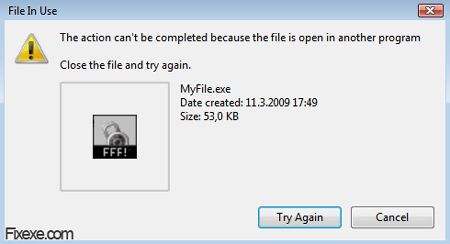
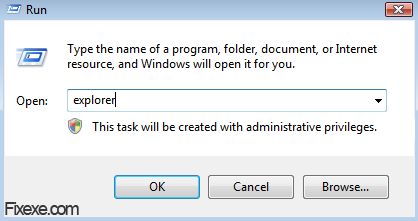
In most cases this is caused by explorer.exe, which is accessing to this file. You can kill explorer.exe via task manager (CTRL+ALT+DELETE). Note: your desktop will go blank. While explorer.exe is not running you can delete your file accessing it via task manager. To run it again, simply press Windows button (keyboard) + R, type explorer.exe and hit enter.
If method described above won’t work probably means that some 3rd party program is using exact .exe file you trying to remove.
In this case you can simply use a tool called Unlocker, which can be downloaded from our site:
 Unlocker (210.6 KiB, 7,247 downloads)

У меня Windows XP SP2 x32, Java установил, запускаю minecraft v.1.4.3 (самая свежая), а у меня вылазит окно и там написано Could not crteae the java virtual machine ! Не знаю почему, переустанавливал Minecraft, а толку нет! Помогите!!!
easy way:
click start, type in SERVICES.MSC, look for windows defender, in the general tab just click stop. Go and delete your file.
I cut it and paste on Recycle Bin then i emptied the Recycle Bin…. :)
Worked like a charm. I scanned it prior to using and it is NOT a virus. Easy to use and finally the annoying file that I could not delete is gone! Yea!!! Thank you :-)
you can also delete the file with LongPathTool. :)
Was getting the message “the program is open in Windows Defender”. Easiest way to delete the file is actually to move the file to a different folder (not the desktop) where you can delete it. Seems odd that you can move the file but not delete it, but hey, that’s windows for you.
Warning: the unlocker was a virus… don’t use it
the unlocker was a virus,it was instantly blocked by my avg and was reported a harmful file,be carefull
Okay I got the unlocker but how do I use it?
I was trying to download maplestory & changed my mind and I got a MSSetup100.exe and I can’t delete it for the life of me!
The Unlocker is working fine thanx
Oh my god, thank you so much! :D
That unlocker tool did its job perfect!
My virus scanner said the file is unsafe and this entire website links to viruses and trojans
Super duper! I finally got rid of an annoying exe-file! I tried the Unlocker via another site, but that didn’t work out for me. I’m glad I found this simple option. Thank you! :-)
to delete autorun.exe from ext harddisk or pendrive or hd :
1. ctrl + alt + del
2. delete explorer.exe
3. go back to task manager >>>File>> New Task (Run)
4. type explorer.exe (please dont go to windows folder and use explorer from there, just type explorer.exe
5. it works!
Note: I am not a windows user.
I am reading this, and what it sounds like to me is that explorer.exe is permanently viewing/running/using the files in the desktop directory. Always. Forever. As long as the explorer.exe is running. So the reason why the exes can’t be deleted is exactly the same reason why I can’t eject a drive while I’m editing a file that’s saved on the drive.
Is this bad programming or am I just confused?
I’ve been having this Cannot Delete .Exe File for quite sometime, tried a few ways still couldn’t solve it until today I got your UNLOCKER downloaded to my laptop & my problem’s gone! Thank You Very Much :) Keep Up The Splendid Job Guys
cool.. you saved me of troubles.. I hope the .exe file I was trying to delete wasn’t a virus
thanks.. tool did the trick
I am glad you described right way to get ride of this file in use message!
I am glad you described this method, I finally managed to delete those .exe files from desktop.
I didn’t try first method, but I can tell that I managed to delete file in use easily by using this tool.
Thanks!