There would have surely been instances when while opening or running Task manager you’d notice that the task manager top-level menu bar and tabs would not be visible i.e. they would be missing. To fix this issue follow the instructions below.
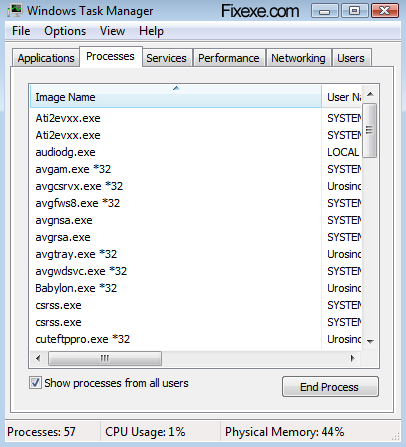
Normally when you open Task manger you would see a menu that has various options like File, Options, View and Help pull-down options and also different tabs to show details on Performance, Networking, Applications, Processes, Services and Users. There would be an instance when you will not be able to notice any of these menus and the various tabs will also be missing.
This is not really a matter of concern as the tabs and menus that are not visible in the user interface is actually because windows is running in compact mode. This normally happens when Windows is running in tiny foot-print compact mode. While windows is running in this mode, it’s a feature of Windows task manager to run in compact mode. While running in this mode, you cannot view the menu bar, tabs and also the top and bottom window border frames that hold the Minimize, maximize, quit/exit buttons and the status bar are all hidden and are not visible. Actually, you can get the Task manager to go into this mode at any time by just double clicking on the empty space that surrounds the border or the empty space that is in the border around the tabs of the Task Manager.
In order to switch the Task manager back to its original full mode and to be able to view the menu option, tabs, the status bar and the other tabs back, you will have to just simply double click on the empty area around the border of the Task Manager window once again. By doing this you will be able to restore the Task Manager back to its default mode with all the options and tabs visible.
Fix missing tabs and menu options in Windows Task Manager
April 2, 2009 by Fixy

Wow! that’s great. I thought I had a virus or something..what a relief
Smart and quick fix, TY.
Thanks a Lot…
Many thanks. Easy fix if you know what to do. Glad you figured it out for all of us!
Many thanks!!!
Thank you double times buddy
Thank you Double times buddy, 5 minutes search but 1 second fixing great once again double times thanks.
Sept.2012 – It work Great. Thanks.
Thank you for posting! I’ve have the issue for a few months but have been too busy to take the time to fix it… little did I know it was a 2 second search and a 1/2 a second fix! So thank you! This helps out a lot!
thank you so much
yeppp… it worked
thanx buddy…
THANK YOU!!
hi
hi,
Yes it is worked.The problem was we clicked the border sometimes.
Thank you.
Thanks very much. I thgt I had virus damage for months. Must of clicked it inadvertantly one day. From comments looks like many others have to. Bloody Microsoft inefficient huge corporation. Can’t even push better user experience changes through their management tangle. A simple sentence on grey area when in this reduced mode saying “Reduced GUI mode – Click border to restore!” would of solved it for all.
thanks for the help.the touch pad on the aspire one i have is super sensitive.must have double clicked by accident.now i have my tabs working again.
thank you.
Thank you. Double click the border, again thank you.
Thanks! This was driving me mad :)
Yes !!!!! It is working again
Thank’s a lot
+1 Amazing I was so puzzled when they abruptly disappeared one day How did you ever discover this?
Thank you , it worked !
thanks, helped!
thanks that’s been bugging me for weeks
Thank you.
*see other message* But the guy who made this is advertising.
It helped for me! I thougt it was a virus.
Why does this even exist
thank u so much,it works well for me
awesome tip thanks for posting this
Thanks for the great help. I am info sec expert still unware of this.
DOH!
THANx!!!
Hay.. ur my hero.. thanks a lot.
It worked! Thank you so much. This problem has been very problematic in many instances.
Thank you very much! Love when it’s so simple!!
Thanks SO MUCH!!!
haha wow i thought i fucked it up or got a virus or something ty
This worked actually i am searching for this option from few months as I was not aware how it disappeared. thanks anyway
Thanks for posting this, it helped me out.
it’s not virus or any other
just double click the borders u’ll get it back
I wondered if I could swich modes with the keyboard. I haven’t found a solution, yet :-(
actually im not gay really honest
@bummer
omg ty i wanna bum u jk
Oh… My God!!!
Cynic… It’s Work…
ThanX So much.
hey pips. i have a question?
mine does not restore the menu bar.
my taskbar is in full mode. not in footprint. i have tried many sites.
but no one else has the same prob.
where could i fix this prob. thx
Great thank you –
HOWEVER – this whole post could have been summed up in one sentence!
You double click the gray border.
thank you so much, I managed to get my tabs back
it worked