The most exasperating experience we can ever go through is when our computer crashes or causes trouble due to virus. These trojans can actually hide themselves into the system and cause trouble enough to disable our windows task manager, registry editor, folder options and the show hidden files and folders option.

Because of this, you would not be able to view your hidden files, folders and drives on your system even after you would change the settings to show these hidden files. The virus forces the system to keep the hidden files hidden forever.
An antivirus software will most probably be able to get rid of the virus but sometimes this does not happen and under such circumstances you will need to manually make amends to enable working of the “show hidden files and folders” option.
To start off go to the “Start Menu” and click on “Run”. If you are using Windows Vista or Windows 7 OS then you will need to click on the “Start Search” option under the “Start Menu”. A pop up box would appear and you will have to type “RegEdit” and press enter to run the Registry Editor. Then click on the “Registry Key” option and find the following key:
HKEY_LOCAL_MACHINE\SOFTWARE\Microsoft\Windows\CurrentVersion\Explorer\Advanced\Folder\Hidden\SHOWALL
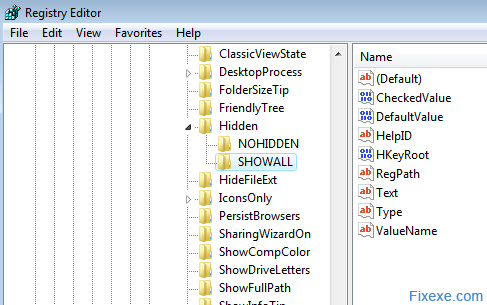
After this you would need to check in the right pane if the value data of the CheckedValue is REG_DWORD. If it is not then we would have to delete the CheckedValue value data and create a new 32 bit DWORD Value and name it as CheckedValue. Once created, click the CheckedValue and type its value data to be 1.
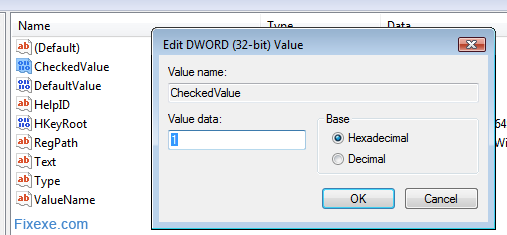
Once this is done, check if the Type value data is of REG_SZ type and has the value data ratio. The last procedure will set the system to the “Show all Hidden files and folders” option. Once this is done all the hidden files and folders should be made visible.

If the folders are not visible even after this procedure, then the chances are that your Registry Editor has been disabled. To activate the Registry editor, there is a free tool available called the Remove Restrictions Tool (RRT) that enables all what the virus had previously disabled. The RRT can help us re-enable the Registry tools, Ctrl+Alt+Del function, Folder options and the Show Hidden files options.
 Remove Restrictions Tool (14.9 KiB, 18,158 downloads)
Password: fixexe
The Registry editor can be activated manually too. It’s recommend to first scan a computer to clean the virus. After which on the “Run” (Windows key +R) tab you need to type:
HKCU\Software\Microsoft\Windows\Current Version\Policies\System\vDisableRegistryTools\tREG_DWORD/d0/f
This will re-enable the registry editor and after which we can check if the “show files and folders” option is working.
If the folders are not visible even after this, then it probably is a registry problem which can be solved with the help of a good registry cleaner. ASC or CCleaner are registry cleaners that help us scan for the registry errors. Once you fix registry, hidden folders will be visible after you restart Windows.

i have one problem that is similar to that and extra to that one i lso have another problem if i insert a USB and open it, there goes files named porn, secret. i also have SVCHOST in my computer but i can not delete it at alll. it refuses and tell me i need permission fro trusted installer or whatever the hell they are. it is really pissing…somebody heeeeelp!!!
thanks my dear
My .jpg files changed to .jpg.enc , In a folder protected using Hide Folders, the images dont open or display thumbnail even erasing the .enc extension, the hidden attribute was gray and not clickable, but in the cmd I’ve changed it but the files remain the same only the thumbnail not translucid, tried open with photoshop, photopaint, corel, and nothing. Erasing the second extension .enc leaving only .jpg don’t do anything.
Any suggestions?? Hope you can help… Thanks.
Yep – same here. Faded icons whether I ‘unhide’ them using any suggestions I have rad to date do not work. My music folders being this way will not let me drag and drop them into iTunes… I think virus creators and hackers should get the death penalty.
i’m also facing same kinda problem but quite different due to some problem my computer suddenly showing my hidden files when exploring the drive locations….so i again chose the option in folder option as “do not show hidden files and folders” and after restarting my computer i’m still viewing my hidden files in a faded folder icon look….. so cud u fix this problem thanks in advance….
it didnt help at all. this all started after i opened one of the binladen virus in face book.. everything in its right place at reg edit, i can also choose the “show all hidden files and folders” but still it keeps on not showing the hidden files.. more help pls..
Im running windows xp, i got infected by virus or malware of some sort, i got rid of it using malwarebyte… after deleting infections my .exe files disappeared… how can i recover them? im desperate
what if the im using windows xp
Thank you,for your guide
If so, I would really recommend you to get yourself a registry cleaner. People here say the best choice is Registry Easy. License is not so expensive so you should get one.
Hi iTechGuy(!)
I’ve almost done everything related to you helpful guides but none of them helped me so I ran the “Registry Easy”. It says I have 2795(!!!) entries which cannot be deleted; unfortunately, I can’t buy the license now!! My antivirus (Avast), though newly updated, seems unable to delete effectively. Still got (1) hidden folder problems, I got (2)“Task Manager disabled by Administrator”, neither fixexe nor any other cop/paste commands could help me. My laptop is pathetically slow and anytime I RESTART it, I got a new surprise: (3)desktop icons and task manager were missing; then I temporary solved it by typing “explorer” in Run. But now (4)run doesn’t work and I have to go to: “C:\Documents and Settings\ME\Start Menu\Programs\Accessories” to type “explorer” in it to have my desktop back! Local drives won’t be opened because of a sort of “administrator” problem. Still I can open them with explore since after every restart still “my documents” exists!!! Is there any way that I can fix these things MANUALLY in some ways! Please help me to get out of my miseries…! TNkzzzzzzzzzzzzzzzzz
Registry easy with the license in most cases does fix registry issues.
Could you please describe your problem and I will be happy to help you.
dammit! none of dem worked! i’ve got registry easy nd got da licence nd all dat but still that does NOT fix the prob!
Hi,
In Folder option/view, i can not find “hide protected operating system files” what should I do?
please help me,
and if it is not problem, email the answer to my mail address ([email protected])
with best regard.thanks
Ok, but what if I use Windows XP? I’m having this problem today, thanks a lot
i was wondering if this would show the key logger or if you have a spy program on the computer where would it be? please help!
Thank you loads, I fixed it! :)
thanks a lot bro….
It worked. Thanks.
problem solved in a minute.. thanks
@Justin
If you would read post you would know. You need to download the tool to unlock/enable your Windows registry.
what do i do if my registry edit is blocked to
thanks God! my files are again visible!
This mostly happens because people don’t scan their computers for viruses often enough.
My sister had exact same problem, she couldn’t seen hidden folders and files even if she had checked this in options.
I managed to get hidden files display after following this instruction. It was probably caused by a virus.