You get a message saying Task Manager has been disabled by your administrator, which means your PC got infected with a virus, and you can no longer access to your task manager.

Here we will show you a few simple methods to fix task manager related issue:
- Navigate to Windows start button and click on “Run”

- Once “Run” window is displaying copy/paste following command
REG add HKCU\Software\Microsoft\Windows\CurrentVersion\Policies\System /v DisableTaskMgr /t REG_DWORD /d 0 /f
If your computer is badly infected, and you can’t even access to Run window you will need to manually run registry fix
- Download EnableTaskManager.reg and run it
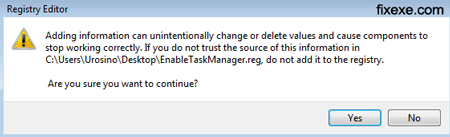
- To confirm change in your registry click on “Yes” button

thanks alot it solve my problem concerning about task manager.
when i go to control panel
select user account
select add or remove
select account
change accout type
try to change it back to adminstrator
change it to adim
hit change accout type
it stay on standard user
why cant i change it back to adim
Hi iTechGuy(!)
I’ve almost done everything related to you helpful guides but none of them helped me so I ran the “Registry Easy”. It says I have 2795(!!!) entries which cannot be deleted; unfortunately, I can’t buy the license now!! My antivirus (Avast), though newly updated, seems unable to delete effectively. Still got (1) hidden folder problems, I got (2)“Task Manager disabled by Administrator”, neither fixexe nor any other cop/paste commands could help me. My laptop is pathetically slow and anytime I RESTART it, I got a new surprise: (3)desktop icons and task manager were missing; then I temporary solved it by typing “explorer” in Run. But now (4)run doesn’t work and I have to go to: “C:\Documents and Settings\ME\Start Menu\Programs\Accessories” to type “explorer” in it to have my desktop back! Local drives won’t be opened because of a sort of “administrator” problem. Still I can open them with explore since after every restart still “my documents” exists!!! Is there any way that I can fix these things MANUALLY in some ways! Please help me to get out of my miseries…! TNkzzzzzzzzzzzzzzzzz
i try all suggestion above but and i got the answer but when i restart my computer the the same problem appears and i use MACAFEE ANTI VIRUS in my PC but thanxx for your suggestion
thanks guys fix , fixed my problem of task manager it really enabled.
@Roger
Did you follow the link PowerTech has mentioned above? It should enable Registry Editing.
My Run Registry also was in trouble. When I downloaded and run the Enable Task Manager, I was obstructed by the message “Registry Editing has been disabled by the Administrator”
Help, message says it has been blocked by your network administrator.
It’s amazing how you can simplify things. Task Manager issue has been solved, using registry fix.
thanks so much. It worked perfectly fine for me. So appreciated it
@Justin
Did you try this in a safe mod Justin?
If this won’t work, download the tool from this page, and apply registry settings.
https://fixexe.com/fix-show-hidden-files-and-folders-problem/
This still doesnt work! what should i do?
All-in-one Solution is to use Wormblaster! it restores all your pc’s config in just one click. plus it got lots of auto=repair function. and disables auto run of flash drives etc. jsut try it! programmed by a 14 year old kid from The Ph.
I ran this registry fix in a safe mode, and for now Task Manager is working for me!
THANK YOU for this, I’ve been trying to open TM on my parent’s computer and couldnt. Aparently their spyware isnt as good as they thought (I on the other hand have never bothered with one and I have yet to encounter any malware/etc on mine haha). However, I thought this was going to solve my little problem where I cant access their drive C. It says access denied and when I try to reboot it says so as well. I tried to run it on safe mode but when I do it shows some drivers on DOS and then freezes. I’ve been trying to figure it out for the past 12 hours and Im not really good at this computer gimmick so would you have a solution for that? please, pleeaase with a cherry on top, and tyvm.
@srijan sharma
I recommend you to restart your computer in a safe mode. Then apply this registry tweak.
Make sure you scan your pc for malware after this task manager is enabled.
If you need any additional help on this let us know.
hi,my computer is affected.
it disables taskmanager and registry only.and disables them every few seconds.it runs in a loop.
i tried all the steps to enable the taskmanager and registry.
it works for sometime but the virus starts itself when i start any program.
i have also tried by installing a new window but there also i got same problem.
can u give me some suggestion to help me.
i cannot fix the problem please help me.
It’s mostly because of a virus. I recommend you to check your computer for a spyware or malware.
Fix worked here… does anyone know if this is caused by virus or human mistake?
You are welcome, I am glad it worked!
Second method worked for me.. disabled Task Manager is finally past!
This registry fix solved my issue with task manager, now I need to find which virus has caused this.
Thank you!