Microsoft Hotmail (live.com) has now finally added POP3 and SMTP support for all users of their Hotmail email service. Earlier this facility was available only for those users who were using the paid version of Windows Live Hotmail plus.
With this feature we can now use desktop email clients to access Hotmail and send emails using the email provider. You can actually access our Hotmail mailboxes without opening the web browser to view your messages online. Hotmail has decided to start providing this support region wise. It has been decided that by the end 2009 Hotmail users in all countries will have this service.
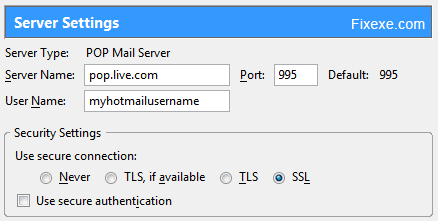
In order to access Hotmail through the desktop email software, the following Hotmail POP3 and SMTP configuration settings need to be setup.
Incoming POP3 server: pop3.live.com
Incoming Server POP Port: 995
Incoming server POP SSL Encryption: Yes (On or Required)
Outgoing Server (SMTP Server): smtp.live.com
Outgoing Server SMTP Port: 25
Outgoing Server Authentication: Yes
Outgoing Server TLS or SSL Secure Encrypted Connection: Yes
Username: Your Windows Live ID
Password: Your password used to access Hotmail id
You don’t need to configure POP3 on the Hotmail website. After these steps, you can access you Hotmail inbox in our desktop email service whether it’s Outlook, Outlook Express, Windows Live Mail or Mozilla Thunderbird.

Because hotmail is more secure as compare to gmail.If u got a mail in gmail account related to marries then add will show Sadi.com in your inbox .how gmail know it .thats why hotmail………………..hahhahahahha
(my answer to sum of 2+3 was “Let me get back to you… my calculator needs a battery”. Your system would have none of it. What security!)
Thank you much!. I have been creating, deleting, and recreating accounts trying to resolve this issue that pops up (for me) as the “negative vibes” fiasco. This is THE ONLY THING THAT WORKED, and I have tried at least 15 expert configurations. Ask for a raise.
Thanks again
Thanks for the info, much appreciated.
You can argue on this issue, because only in a dispute can come true. :)
But you do not need to set up POP3 on Hotmail website, do you?
At least hotmail offers some privacy, while Gmail keeps your e-mails for as long they want, even when you deleted them.
Haha.. what would anyone use Hotmail, when Gmail offers you everything you need.
it was question of time when they will start offering this!… thanks for this.. its working
Thanks! So now I can finally use Hotmail email account in Outlook Express.