Are you wondering how to set Google.com (US) English as your default search engine in your browser? By default Google.com will redirect you to the Google interface in your language (google.co.uk , google.com.au , google.ba , google.be , google.co.jp google.si , …) based on your location.
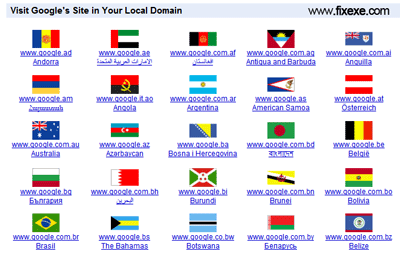
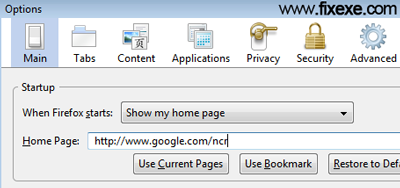
Follow these simple steps to set Google.com as a your home page in your browser (Internet Explorer, FireFox, Chrome, Opera).
- go to your browser’s main options
- set your home page as
http://www.google.com/ncr - click on OK or Apply button

It’s so good
Hello, Neat post. There is a problem with your website in web explorer, may check this IE still is the market leader and a large component of folks will leave out your magnificent writing because of this problem. gekbcebgdadg
i echo many other comments. Please let me control the language. Just because I am living in Mexico that doesn’t mean I am fluent in Spanish. Or if I visit Japan I am fluent in Japanese. Leave us some control please
Google techs need to get out more. Seem to think that because someone is in a particular country that must be their language.
Thanks, I tried a lot to find it out, but i can’t.
khuzaima
Very nice site!
Hello! gebeeaa interesting gebeeaa site! I’m really like it! Very, very gebeeaa good!
didnt work
It’s truly weird! Google.com,ph is in English, when I go to google.com, it’s in Philippine language. And there’s nowhere to switch google.com to English! Is this a trick?
in my case it does not work
Whatever I do, I always get google.com in french or dutch or another language, but never in english
I thought that Google was an american company
Why can I not search in english
Am frustrated
in last few day opera 12.02 opens google.com site on my machine in chinese or some other asian language. I’m living in Serbia & this makes me very nervous. does anybody knows how to resolve this problem?
Thanks in advance.
Very useful! Thanks very much!
What is I don’t wish to have google as my home page? What other avenue is there? … another search engine?
Why did Facebook temporary lock me out of account
this still DOESNT WORK! i am starting to get frustrated!! :(
For some reason Google English has switched to Japanese. When I go to a site it’s in Japanese.
I’m using Safari 10.1. How do I change it to English?
It is mutch better to use “http://www.google.com/webhp?hl=en”.
“http://www.google.com/ncr” will not always solve the problem.
It does not work for people in Finland for instance.
There is a weird bug here that if instead of Finnish you want English and either set “http://www.google.com/ncr” on the address bar or klick on the “Google.com in English” button at Google.fi, you instead get Google in Swedish… the second official language of Finland.
It is really odd, because the link seas “in English” and gives you Swedish.
heY
THNX iT soLVe mY pRoBlEm :)
english language by defalt
thnx a lot
As a non-techy 79-year-old I am in Mexico for 3 month. My computor was just swept clean by a friend, but now I can’t seem to get completely out of Spanish. I hold out against things like Google whatever,trying to keep it uncluttered and truly basic for now. How do I get Google to go back to always using English?
Thank you!!!! Google.com had developed this nasty habit of showing me the start page and results in German, simply because my computer is set to “German” (I am actually currently in Russia, so the switch was not even location-related). Worst of all, the option “Google.com in English” has disappeared from the home page. Annoying. I don’t want to be patronized like this.
Solved my home page problem
thanks a lot !!!!
the best way !!
search firefox search engine add on, select google english then go to “manage search engines ” remove google and select google english
thanks a lot!
Here’s how I went about this problem, particularly if you don’t want google.com to be your default home page (as awesome a search engine it is, I prefer yahoo.com as my default): in Firefox, make sure your bookmarks toolbar is activated [Go to View/Toolbars/ and click Bookmarks]. In the address bar type http://www.google.com/ncr and when the page comes on, save it as an icon by left clicking (anywhere on the page) and drag+drop it onto the Bookmarks toolbar. Now every time you want to get an English-default Google home page, you just click that icon. (I believe this principle works in other browsers, too).
Great tip .. I like Firefox even more
Not to mention you can also remove annoying Firefox’s homepage using this tip. Thank you guys, you are great!
Solved my home page problem in a blink!
For everyone else who read this site. This also worked for a Firefox Google redirection. Now you can finally set google.com as your home page.
thanks.. this solved annoying local domain redirecton!
finally! google.si is past lol
I was always getting redirected to google.co.uk
Thank you guys, you saved me a lot of trouble!