Do you want to remove an old Windows Messenger, known as MSN from your computer? Here is the way to uninstall built-in Messenger that automatically installs with Windows itself.
- navigate to X:\Windows\inf and check for a file named sysoc.inf
- make sure you back up sysoc.inf in case anything goes wrong
- open sysoc.inf in your favorite text editor
- find line
msmsgs=msgrocm.dll,OcEntry,msmsgs.inf,hide,7
- remove “hide” part from this code to get
msmsgs=msgrocm.dll,OcEntry,msmsgs.inf,,7 - save file the sysoc.inf file
Now you will be able to remove MSN Messenger.
- go to start Control Panel
- open Add or Remove Programs
- scroll down to the bottom and select Windows Messenger
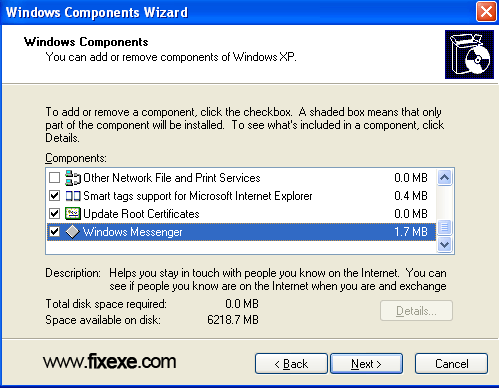
- click next button to permanently remove MSN

Three groups are covered under the uninsured motorist provision. The insured, members of his or her household, and any other QuotesChimp legally entitled to recover damages are protected under the un�insured motorist provision of an auto policy. The coverage also applies to injuries sustained by the insured or householders who are injured as pedestrians by an uninsured motorist.
I bought Plus for XP, rctneely, then I installed it. I was expecting a Microsoft Plus that added great features like Plus 98. But, it was nothing like that. First, there was 4 measily little themes. And the fish screen saver, which if you want more fish, you’d have to pay for it. Well what was the $ for anyway? And the games! For heavens sake. Why put a stinkin lite edition into a $ collection of programs. And there are other programs that I might not fool with anyway. For those who are looking to buy this, please note that you at least need a 500 megahertz computer, 64MB of RAM, and a 3D video card with 16, I repeat 16MB of video memory. If Microsoft had added such things as an Antivirus to the program, more desktop themes, FULL EDITION Games, and less steep requirements, then I’d recommend this to everyone. So if your at the store, leave this on the shelf!!!PS This program is a prime example of Bloatware.
guys you encounter 2009 version error when you sign in it says server is temporary unaavailable? error code 8000401a?
you guys got fix on this?
@Depressed
I do… My new version got virus so I had to use that one until I got virus removed xD
good, who needs first version of msn these days…
It’s good to see this msn finally removed. I am not even sure why is this installed with Windows itself.