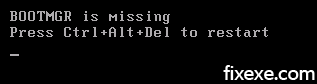
Follow this tip to fix an issue with Vista saying “BOOTMGR is missing” while trying to boot your computer.
Before you start make sure your Windows Vista DVD or Vista Recovery disc is inserted.
- select language and click next button
- navigate to the bottom left corner entitled startup repair and the problem with booting will be fixed
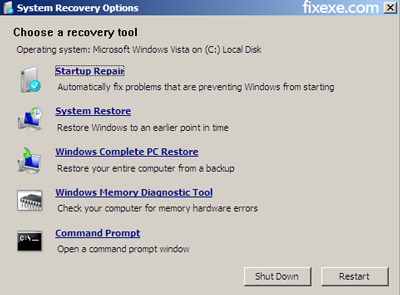
- choose correct Windows installation you want to fix
Your problem with booting should be now resolved.

Hi, Dont know about pc a lot.I have a Vista home premium 64 bit HP desk top pc.When I was helping my son with homework some window update appeared I clicked ok.After the messege appeared,the window didnot find file revert installation.It done it by itself.Then, “Please insert the installation disk.” I have only the recovery disks which I bought from HP 3 years before I bought my pc.window can’t start so I go to recovery by pressing F11. click recover from disk.followed direction and insert disk 1 then disk 2 then disk 3.At the end finish to restart your pc and I did so but it didnot start.error messege appear, Boot Mgr missing press Ctrl+Alt+Delto restart computer.I did so.Didnot start I did it several times but same messege appeared.Please Heeeeeelp!!!
When you get this error on your computer there is really nothing you can do if all else fails, say goodbye to all your files and programs and just format your HDD and install Windows XP. I never got an error after that and next time you either go into your Windows folder or get a program where after you run it your icons have suddenly dissapeared it means your system is f***ed. also there is only 2 ways to get XP now, by an actual CD or a torrent. I got the torrent and fixed multiple systems with 1 CD and no need to buy those keys to activate cause it automatically does it. but seriously guys STAY OUT OF YOUR WINDOWS FOLDER :P
Reinstalling vista get bootmgr have tried all solutions including wiping drive and repartitioning and formating no os system will install what can i do?
When i turn on the laptop I just get message saying BOOTMGR is missing. Have tried press Ctrl+Alt+Del without any luck. a command marker is flashing but when I try to type the PC just makes a noise, nothing else. What do I do now???
I am so thankful for your simple solution. The other solutions that were offered at other sites did not work. Thanks a million!!
My hard drive went out so I replaced it. Now when I try to install windows I get Bootmgr is missing. What can I do now? Repairing windows is not an option since the drive has nothing on it. I replaced the hard drive with the exact same model as the last. I have an HP Pavilion 9700 series
I having this problem also.. seem everyone having this problem with vista..
worse, i do not have this dvd.. could not even get in at all..
I have an Acer and I keep getting the BootMgr is missing, when I try to reload using the system disk, it asks for Image disk 1, I have no clue what that is. any help well be appreciated.
I also have BOOTMGR is missing. I tried the fix as described above but when I try to “repair your computer” it tells me I have no drivers. Any suggestions?
Hi
I can’t boot from my windows vista cd… even after I rebooted. I tried setting it to 1st set up device but now it shows.
Boot from CD:
BOOTMGR is missing
Press Ctrl+Alt+Del to restart
I have this problem too, however i dont know how to get into the boot command. Everything ive tried does not work. I insert the disk and it says disk boot failure, insert system disk and press enter. i reinstert the disk and still doesnt work. what can i do?
windows vista home premium
Acer aspire t180
thanks
While trying to install vista it just completely freezes and I have to reboot and it does this every time. could be it the graphics card or what? pleeeeease help meeee!
Hi
I can get to a command prompt and run rebuildbcd, it says 0 installations found. how do i build a bootmanager for an installation i know exists?
cheers
IT won’t let me get to the command prompt at all and I don’t have the disc or anything.
I have tried all that and it doesn’t accept the dvd, I had 2 partitions in the hard drive and I think when I created the second partition the main one became inactive and the second one became the main one!
I did this steps but it doesnt work. What should i do now?:s
hii
i can not get it to work whyyy ?
i have a disc and i know what to do but when it gets on to this bit [img]image18[/img] i cant find windows vista like in the picture whatt can i do please write back i need help
sign
bob x
Worked like a charm for me!
If this won’t work you can also try with those commands:
bcdedit /export C:\BCD_Backup
ren c:\boot\bcd bcd.old
bootrec /rebuildbcd
Thank you guys, I finally managed to solve this annoying boot issue!
For those who can’t get Vista boot properly type open command prompt and type:
bootrec /fixboot