YouTube has been really slow for the last few weeks, some people say months. It takes ages before you can play a video, all you see is endless loading and very slow buffering. Let’s presume you don’t have a dial-up connection. If you do, it’s very advisable not to run videos in a high quality (HQ) or high definition (HD).

If you have a ADSL connection or higher, follow these steps to make YouTube loading fast again. We are going to change the DNS servers you got from your ISP.
This particularly method, to speed up YouTube is shown for Windows Vista, but should look quite similar on Win XP, or even on Windows 7 and Windows 8.
- Go Windows Start button, and run Control Panel.
- Click on Network and Sharing Center.
- Select Manage network connections.
- Double click on active internet connection, probably named as Local Area Connection.
- Click Properties.
- Now double click Internet Protocol Version 4 (TCP/IPv4), located in middle form.
- Select Use the following DNS server addressed, and change them to:
Preferred DNS Server: 208.67.222.222
Alternate DNS Server: 208.67.222.220
Updated on 10.01.2013: If you are located in Europe, I would recommend you to use Google’s public DNS servers:
Preferred DNS Server: 8.8.8.8
Alternate DNS Server: 8.8.4.4
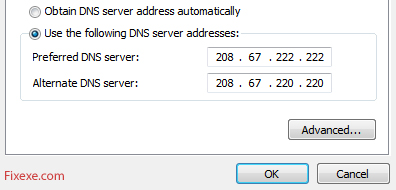
- Click OK to confirm changes to Open DNS servers.
Great. YouTube videos should be loading fast again.
Just a tip. If you are wondering to what server does YouTube redirect you (from where videos are loaded), visit the following URL:
http://redirector.c.YouTube.com/report_mapping
And post the server number in your comment, so we can help you from there.

115.240.98.202 => reliance-bom
69.160.125.171 => digicel-kin1 (69.160.112.0/20)
14.139.34.2 => nkn-del1
@Fail, you truly are an asshole.
It’s not ANY DNS, but it’s Google Public DNS service, if you ever heard of Google.
Why changing to their DNS? Because it’s more secure, better response times and it’s a good chance you may get connected to the better Youtube cache mirror server, and that’s why your videos may load and play faster, with no buffering.
Are you f-ing nuts?
Have you never heard of DNS spoofing (Google it)? But sure, hey, just change your DNS servers to these random IP Addresses, let me impersonate any site I want and just trust me not to steal your banking details.
Worst tip ever
It worked for one video for me
Please using cable modem
24.86.236.197 => shaw-yvr1
A lot of people is commenting on this, but it is not always a matter of DNS. At the moment I struggle with something between Noscript plugin and Youtube. What it is I have not figured out, but as all other browsers (including Firefox without Noscript) loads fast it is related to Noscript somehow.
109.182.44.96 => bud02s05
31.15.191.9 => telemach-lju1
31.176.247.70 => fra02s13
fra02s13
getnorway-osl1
96.18.2.201 => dfw06s19
Nice, i have a mac, but it is easy to figure out on a mac, Ill say how to anyway though.
1. Go to System Preferences
2. Click Network
3. Click Advanced near the bottom right corner
4. Click the Tap DNS
5. Change it to one of the IPs above by pressing +
6. Press Ok then press apply, then your done.
110.33.0.133 => optus-syd3
77.254.108.93 => netia-poz1
24.133.163.108 => dfw06s35
66.168.205.239 => atl14s17
didn’t work for me
68.53.173.104 => iad23x01
WOW this worked!
I could barely load regular videos before, now i can watch 1080p no problem, verified this worked for me after many days of being very pissed off.
90.149.32.36 => ams09x01
98.225.59.90 => sjc07s11
Videos are loading scary fast now
help alot tksssssss :-bd
75.57.165.151 => ord12s05
46.164.9.118 => amis-mbx1
dint work D: HELP ME please
70.138.248.252 => dfw06s08
71.185.52.68 => iad09s10
youtube still really slow even after i tried changing the dns.
75.184.38.141 => ord12x01
Did you try changing to open dns instead of google’s?
I’ve a severe problem in streaming in youtube. I’m currently subscribed in Vodafone Egypt.
41.68.29.41 => vodafoneeg-cai1
Only work for 4 days now it doesn’t
youtube server:
dfw06s08
67.11.64.222 => xo-dfw1
It didn’t work for bangladesh
Perfect!!
After changing my DNS to your preferred, Youtube started loading normally again, even in the full HD mode. It changed server location to a different one.
Didnt work for me. :(
I am form asia . having the same problem. which ip should i probably use, and should i go to wireless connection or locan area connection.
wow thanks a lot .. it worked.. my u tube is now normal.. thanks…
work for me in spain,thx
Hi,
This worked for like 3 videos and then it became insanely slow again. Please can someone go slaughter the youtube m*f*ers please…
I keeps saying “The network address entered is invalid” What do I do?
DIDN’T WORK
This didn’t work for me.
Thanks..it works a lot
wow fucking speed for me i have only 56 k/bps before now its 500 k/bps
It’s still HORRIBLE. Some videos load up fine, although still kinda slow but its ok. But others…they barely load and its beyond annoying really.
I’m wireless but i went to ‘manage wireless networks’ and did the whole IP4 thing, filled in those DNS numbers, but it’s not doing anything for me.
Didnt work 4 me…. :(
is this really safe?…
i can see any comments
how do u do this on windows 7
thankssssssss so much it great working . me was too bored and angry due to my ptcl evo slow connection on hd type movies . but now it solve problem and loading quickly from youtube . thanks again .
Damn straight I do!
Got milk?
I’ve used open dns for years. It just doesn’t work anymore. Videos just won’t load.
Thank You.. your tip helped a lot! :)
thanks, it worked like a charm!! :D
This worked fo me too on 2 Macs the house PC works fine on the IP DNS. I have no idea why there should be a difference but there is and thanksa million for this one
I loaded a 1 hour video with only buffering twice!
1080p Here I come!
We all know this doesn’t do anything — except, if you’re lucky maybe it’ll help for a day or two.
OK<,I think I spoke to soon….
Loaded up the first video and it went great…
I closed YT and started YT back up…Went back to the (((((DRAGING)))) mode again…
Amazing…FINALLY….
MAY GOD CONTINUE TO WORK IN YOU AND THROUGH YOU>>>SO THAT LIVES MAY BE CHANGED AND COME TO KNOW JESUS CHRIST AS THE LORD AND SAVIOR>>>
Holy crap… i loaded a video that was like 3 min long and it was loaded completely right after i clicked on it…
Wow… Epic find, it works great.
I love you man! it worked!
WTf ? This actually worked, just like that…
Thanks a lot !
Wow.
I would have NEVER thought that changing the DNS servers would solve this. Now YouTube loads 720p videos very fast.
Thanks for sharing this!
AWESOME THIS WORKS PERFECTLY! Thanks a lot!
I’m having problems with finding the “Properties” I have Windows Vista if that would help?
you’ve saved my life!
thought for a year that the problem was my isp.
works like a clock!
wow I cant believe this worked, thanks… especially odd since i was using open DNS already…
umm, not working for me :/
This worked for me in Korea. Thank you.
Is there a like button for this?! Thanks a lot!
Worked like a charm! :) Thanks!
U R DHA BEST!!!!! thank uuuuu!!!!
Thank you so fucking much (:
Sweet
I tried the firefox add on like someone mention, and it works great . thanks to the poster.
i also tried the dns number and then I couldn’t get connected to the net.
Doesn’t seem to work anymore. I tried both the google DNS and the other 208.67.222.222 DNS. This USED to work a few months ago, but doesn’t seem to work anymore. Youtube loads my HD videos very slowly.
Youtube will load part of the video in a “burst”, but then immediately stop for 10-20secs. Then after 10-20secs it’ll do another “burst” and stop again, repeating this process until the video finally loads.
When I first used this alternative DNS(s) it worked like a charm. No more waiting, just pure 100% loaded video. It worked great. But it doesn’t seem to work anymore. I’m back to waiting again.
With all of that said, I have one of the fastest internet connections available – 35/35 symmetrical. So, I’m 100% sure it’s youtube.
Too bad youtube is starting to slow down now, even with this DNS trick. What’s the point of having HD content if it won’t even load. Then again, I’m anal about waiting 10-20secs. I want to use the full capability of my internet connection!
Instant results…..many thanks!!!
@Jess
oh my gosh this realy works thanks!!!!
I’m on wireless and it only shows manage wireless networks and I can’t find a place to configure the DNS. I’m on Windows 7. can anyone help me….
It didd’nt work and i’m in South Africa
wow, my youtube buffering was slow just because of OpenDNS… Changed to Google’s and all it’s back normal! Thanks!
Thanks!! It Worked!! The speed of loading YouTUB has frustrated me for eons.
Thank you man .. its working :)
Thanks for your info, i am so happy with it..
Thank you thank you thank you it FINALLY works better now!
fuck sake, tryed putting the UK DNS setting into my PC, and my Mac Pro is still really struggling with youtube, takes ages!!! what else can i try?
would changing to another company like Sky or BT homhub give me a better download speed??
cheers
oh my gosh, thank you!
this doesnt work worth shit on my pc! so it has got ot be something else!
Fucking love you.
i tried this and it still loads really really slow! Is there anything eles i can do?
oh my fricken god! Are you serious!
I was just trying to load a video. It was buffering at 200KB/sec and I was almost set to fuck youtube and leave it after this bull shit. As the video was buffering, I changed the DNS… nothing. I copied the URL, closed the browser, then re-opened and starting buffering…. OMFG! IT”S WORKING!! Buffering at between roughly 1.3MB-1.6MB/sec continually!
THANK YOU SO MUCH!!!!
o.o i dun like you tube because it is buffering then no video comes up then all of a sudden like 30 minutes later the whole frigging thing is loaded i am like WTF!?!?!?!?!?! then i have to go and do it again and again and again until i find the right one
WAY THE COOL…TIT REALLY SPEED UP..HAHA
THNKS
Web sites will probably load faster now. It won’t effect ping time, since it pings the IP address not domain name itself.
Google videos loaded ridiculously slow for my FiOS on the East Coast. After doing this, they load instantaneously now.
Now i’m just curious how it’ll effect other websites/ping etc?
Even full HD videos on the Youtube loading fast after changing DNS servers! I would never think of this. Thank you so much for speeding up slow buffering movies.
@#37
I know it doesn’t sound right, but it does actually work!
Though I was actually having problems while using Google DNS, and I changed back to my ISP.
While one Google DNS: Even 360p was slow to load, froze every 5 seconds and I had to pause it to view videos in its entirety.
While on ISP DNS: Even 1080p plays fine without even a single freeze.
I can reproduce it without problems too. So there’s definitely something to it.
it’s typo, it’s supposed to be:
208.67.222.222
208.67.220.220
Just stopping by to say thanks, it did the trick!
says prefered and alternate cant be same
I fucking Love you.
This works Great (:
Thank you so much :)!
Live in Korea, was having a hell of a time with youtube. Used the google DNS setting now no problems.
Great…youtube is sooo fast..
Thank you!
I had little hope in this fix, but it worked great. All other sites loaded fine, but youtube videos would take forever. Not anymore!
Try using public google dns.It really faster than opendns for me!
got it !
thanx m8
Ok. I would like to say right now that Igor and Man are both right. No matter what, a dns server simply takes a name and turns it into an ip address. Igor’s phonebook analogy is about as accurate and spot on as it gets. If, for some reason, using another dns server fixes the problem, it is a fluke or, as Man put it, a server that has been made to manipulate youtube. Changing a DNS server to one that some random dude on the internet says is completely unsafe an is bound end in stolen information. Don’t do it. Now, there are some free dns servers out there that are good and safe, such as google’s dns server that you can try and trust to work well. (After all, google probably has the biggest site index in creation.)
Of the many possible reasons for youtube being slow, my money goes towards either youtube needing to expand their bandwidth or server speed or that the isp’s are throttling youtube to save on money. (ISP’s have a history of such greedy behavior, so it wouldn’t be the first time something like this has happened..) Another possibility is that youtube has some bugs that need fixing that they have yet to find.
Fuckdabulls:
-Dude, calm the fuck down and in the very least us grammar that is remotely proper. SHIT. Anyways, I know your pissed and don’t know how to fix the problem, but don’t do stuff that random people tell you unless you know enough about computers to undo it later… Here’s a web page from microsoft on changing internet options. You want to change your dns settings back to “Obtain DNS server address automatically.” Doing this will put you back to square one. You can also just call your internet provider you changed your DNS setting and have them walk you through it…
ass hole my cpu now cant even access youtube before this shiit it was workin very good and fast jus that youtube was slow so i put ur stupid dsn watever and now it cant even load yahoo or google takes 10min and i hav windows vista with great graphics ass hole
u asshole it doesnt work u fucker now my cpu is slower then ever u ass hole i hate u man
now i cant figure out my old dsn u fucker i hope u die and burn in hell stupid white ppl always thinkin dey can fix this shit fucker now myy cpu cant even play fps games it laggz slow as fuck pussy azzz cracker
This did not work for me!!! youtube is still slow for me!!! help me!!!
@christian
If you are using Firefox,there is a add-on available called ” FastestFox ” I installed it last night,and solved the problem with pages not loading. They load almost immediately.
Hi,I tried the fix of Preferred DNS Server & Alternate DNS Server.I made the change @ Properties Internet Protocol (TCP/IP )Typed in as suggested,but it wouldn’t accept the same address in both locations.I also tried it in the Alternate Configurations…User Configured with the same result. Is there some other work around ? Thanking you in advance for any input.
I just Try this I’could be back to add comments
Thank’s for all and Be hapy
doesnt work for me.. too bad.
NEVER change your DNS servers based on some guy like this one saying to, he can find out your passwords to some sites like prepay, google … etc by making a site that looks like the real one(general the login screen) then when you access this site he redirects you to his fake site, it’s very easy actually, and yes youtube may run faster, maybe he found out some servers that run better, put them in his DNS server, and voila it works better, it can’t be a fake… maybe i am just too paranoid, but at least now you know this type of attack
@Joe
erroneous. You assume without sufficient justification that it doesn’t work. When in fact, it has for many people, including myself. therefore, stop with the typing. You’ll only hurt yourself.
I couldn’t sleep while thinking that I messed up the speed of my computer! THANK YOU!!! IT WORKEDDDDDDDDDDDDDDDDDDDDDDDDDDDDDDDD
very interesting trick you have here. i’ll give it a try.
I’ve also posted a trick on how to accelerate youtube video speed in my site. I’ll add your trick to my list. thanks for sharing.
Thank you guys!
This fixed my issue with slow loading videos at Youtube. Now it’s buffering as it should.
S.A.
i have noticed this issue for the last week. i tried everything i have read that i have found online. my download speed is 10megs and youtube is still F*in slow as hell. will play 2 seconds. then buffer for 5-10 seconds, play for another 2 seconds. i wait for it to load by pressing pause but it takes 10-15 min to load a short video. WTF
@Ignor
Yes, in some way you are right about. Once (cache).youtube.com domain is resolved you may not notice an increasement.
But in this way we are not talking about loading Youtube site, but loading the video which is not hosted on same server data center.
And in this way changing DNS to Open DNS or any other free DNS server can do a trick!
I’ve ready many positive feedback around the web.
@trustable
No. If your video is buffering it already has the connection and knows the IP address. Your video is not sent by multiple servers, at least not for you. Load balancing happens solely within the Youtube network where your DNS settings mean nothing.
For the record, you can get better download speeds switching from/to HQ since the videos live on different servers. You may also copy the main URL that leads you to the video, close your browser and open the URL in a new session. Hitting F5 at the video page itself is not enough.
If you experience slowness in loading a video while the rest of the web loads fine then you’re probably connected to a Youtube server that happens to experience a temporary overload, suffers from a bad connection or node in between, or just another technical problem. Youtube has many, many servers all over the world. The server that is sending your particular video to you is chosen by a load balancing system and is determined by your location. It’s almost random. Starting a complete new session (this includes switching to/from HQ) might connect you to another server that works fine.
Furthermore, you might want to Google for ‘cable modem optimize’. Speedguide.net for instance has simple tweaks online that may improve your internet speed by allowing more simultaneous connections, better network connection cache, bigger packets etc.
@Ignor
I think you’ve missed a whole point here. It depends on what DNS server is used. Youtube uses many servers, located all over the US and Europe. So speed depends on which cache server you get connected which is related to DNS at very first place.
Changing DNS servers as mentioned in article can speed up Youtube buffering.
A DNS server translates a domain name to an IP address. It does this only once, after that the client will know what the IP address is.
This advice does not make sense at all. You won’t experience a better sound quality phoning a friend after you’ve looked up the phone number in a different phone book than the one you’re used to. It’s the same thing.
I just wanted to mention that the function of the DNS server is to merely translate the website name that is recognizable to humans – like google.com – to it’s IP address 74.125.65.103.
Therefore, changing the DNS server will have no affect on overall download speed.
not that Youtube is slow.. it’s not even loading for me today
Can this video buffering be also related to browser?
So great! I wouldn’t expect this to solve my Youtube slowness but it did!
Thank you guys!
woooooow!!!! it’s working :DDDD
In this case you need to connect to your router and manually enter those IP’s as DNS1 and DNS2.
what if I have wireless connection… how can I do this?
thank you so much… it’s working!!! also some other sites seem to resolve faster after upgrading dns
Its not working! or is it me? :)
I have also noticed that Youtube has been loading really slow lately. I am going to try this fix tonight and get back to you guys tomorrow. Hope it works :)
Guess what? Youtube is working super faster after changing dns servers as mentioned in guide…
wooow.. it looked this worked for me… at least all videos I tried for now loaded faster than ever before
Mark
This didnt exactly work that well but youtube is alittle faster
Does this only happen to people from Europe? I’ve changed dns servers as mentioned in this article. I hope this will work out as permanent solution.
Better no Youtube, than slow Youtube.
I wish I would have seen this solution sooner as I spent hours trying to fix my internet connection and PC. Now I see problem was on Youtube end, which I find really weird. Could any tech guy explain how could loading be related to DNS?
Thank you guys!
lol this actually seems to work… youtube was driving me crazy with that shitty slow loading…
after all does Google care where are located or why are dns servers important to them?
cool it’s loading normal again
when I thought it was my bad connection… I am really glad I’ve found this fix .. now, Youtube is loading fast again!!!