Archive

Archive for the ‘Software’ Category

How to Fix 4 Common Google Chrome Errors

October 19th, 2011

Although Google Chrome is a fast and efficient browser, it’s a constant work in progress, so it isn’t perfect. The following tips will help you fix the 4 of the most common Google Chrome errors:
Continue reading…

Fix Crashing Firefox 4 or Newer

April 7th, 2011

Firefox is one of the most favorable web browsers among a mass crowd of computer users in existence these days. There are various benefits, such as the plug-ins, that help enhance web browsing experience for computer users all over the world. However, unfortunately, just like most of other applications, Firefox 4 is yet not a perfectly programmed application either. At times, it may hang due to a wide variety of factors. So, what are the factors and how to solve crashing Firefox?

Firefox Crash Fix Crashing Firefox 4 or Newer
Continue reading…

How to Downgrade from New Windows Live Messenger to MSN?

March 31st, 2011

Windows Live Messenger has come to its latest version which is the 2011 version. Of course, Microsoft is trying to offer new features with this latest version of Windows Live Messenger. An example of the new features that this latest messenger application can offer is the capability of appearing online to only certain people as desired by the user and appearing offline to the rest of the contacts. However, besides some of the new features that prove to be quite useful, there are also quite a few alterations in the application and some of these alterations may simply be inconvenient enough for some users. For example, there is no longer the option to show user’s webcam. It is replaced by a button to start a video call instead. With some features being less convenient, some users may want to revert their Windows Live Messenger 2011 to the older 2009 version.

Windows Live Messenger How to Downgrade from New Windows Live Messenger to MSN?
Continue reading…

How to Solve Error Code 0×80004005 While Unzipping

March 18th, 2011

Zipping — or compressing — and unzipping — or extracting — files have become some of the most inevitable things to do in the computer world. The main reason why computer users will want to be able to zip and unzip their files is the limitation of the storage space they have on their system. By zipping some of the files that they only use now and then, computer users will be able to save quite a considerable amount of storage space of their computer’s hard drive. Then, whenever they feel they may need the files again, they can simply unzip them and regain access to those files.

0x80004005 Zip Error How to Solve Error Code 0x80004005 While Unzipping
Continue reading…

How To Keep Your Computer Secure For Free

March 10th, 2011

The antivirus market is huge, lets face it, it’s a pretty easy market to promote, I mean if you have a computer and your connected to the internet, you need to keep your computer secure, obviously if you do things like online banking, online shopping or anything which requires your credit card then you should be worrying about your security. If you just sit on Facebook and do nothing else online, then it’s only your Facebook account at risk, but lets face it, it’s not very nice having your accounts hacked online, it’s even worse if you have your credit card stolen, Paypal account hacked and so on, online security isn’t a joke. Continue reading…

How To Fix Website Loading Time and Speed Up Firefox

March 9th, 2011

Everyone wants web sites and web pages to load faster, there really isn’t anything more time wasting then waiting for a web site to load up, it really comes down to three main factors, your web browser, your internet connection and the server the website your trying to load. Obviously if you’ve got a crappy web browser, like IE6, then it’s going to take longer to load then say you were using Firefox, if you have a better internet connection, then you’ll be able to load websites better and if the website is hosted on a decent server, it’ll load faster.

Speed Up Firefox How To Fix Website Loading Time and Speed Up Firefox
Continue reading…

How Can a Registry Cleaner Speed Up Your Computer?

September 13th, 2010

What Is A Registry Cleaner?

To be simple a registry cleaner is a piece of software that you install on your computer to clean your registry – this is obvious!  The registry on your computer is like a giant database which stores all of your Windows operating system information. Some common information that is stored in the registry is your basic computer information: where you’re background on the computer is saved, how big your screen resolution is, what type of computer hardware you’re using, what type of software you’re using, and many, many others. To get even more detailed into what the registry holds we’re going to get a little technical, so bear with us here; we’ll help you along.

4 How Can a Registry Cleaner Speed Up Your Computer?
Continue reading…

Find out Which Software is Connecting to the Internet

June 1st, 2010

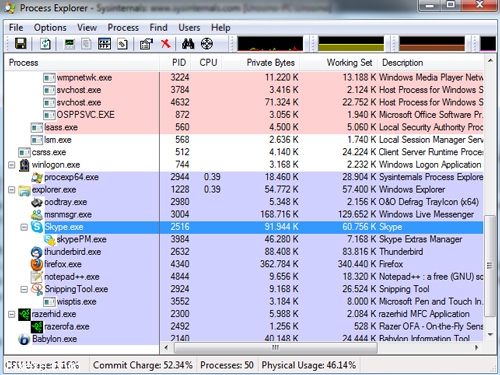
There are some programs that use the internet. It is usually used by software developers to get stats or to verify if your license is legit. It can also be used by hackers though. Most malware is able to steal your information and send it to the hacker via the internet. You can prevent it by using a good firewall.
Process Explorer Find out Which Software is Connecting to the Internet
Continue reading…

Download daa to iso converter

March 31st, 2009

Would you like to convert .daa to an .iso format you can mount or burn with your burning software? Using this tool is probably the fastest free way to convert .daa to files with an .iso extension.
daa files Download daa to iso converter
Continue reading…

Uninstall programs that do not appear in the add or remove

March 28th, 2009

It hardly takes us time to install a program but at the same time when it comes to uninstalling these same programs we could come across a whole range of problems right from the program not being visible in the add or remove program options or there being no uninstall tool available to remove the same.
add or remove programs Uninstall programs that do not appear in the add or remove
Continue reading…